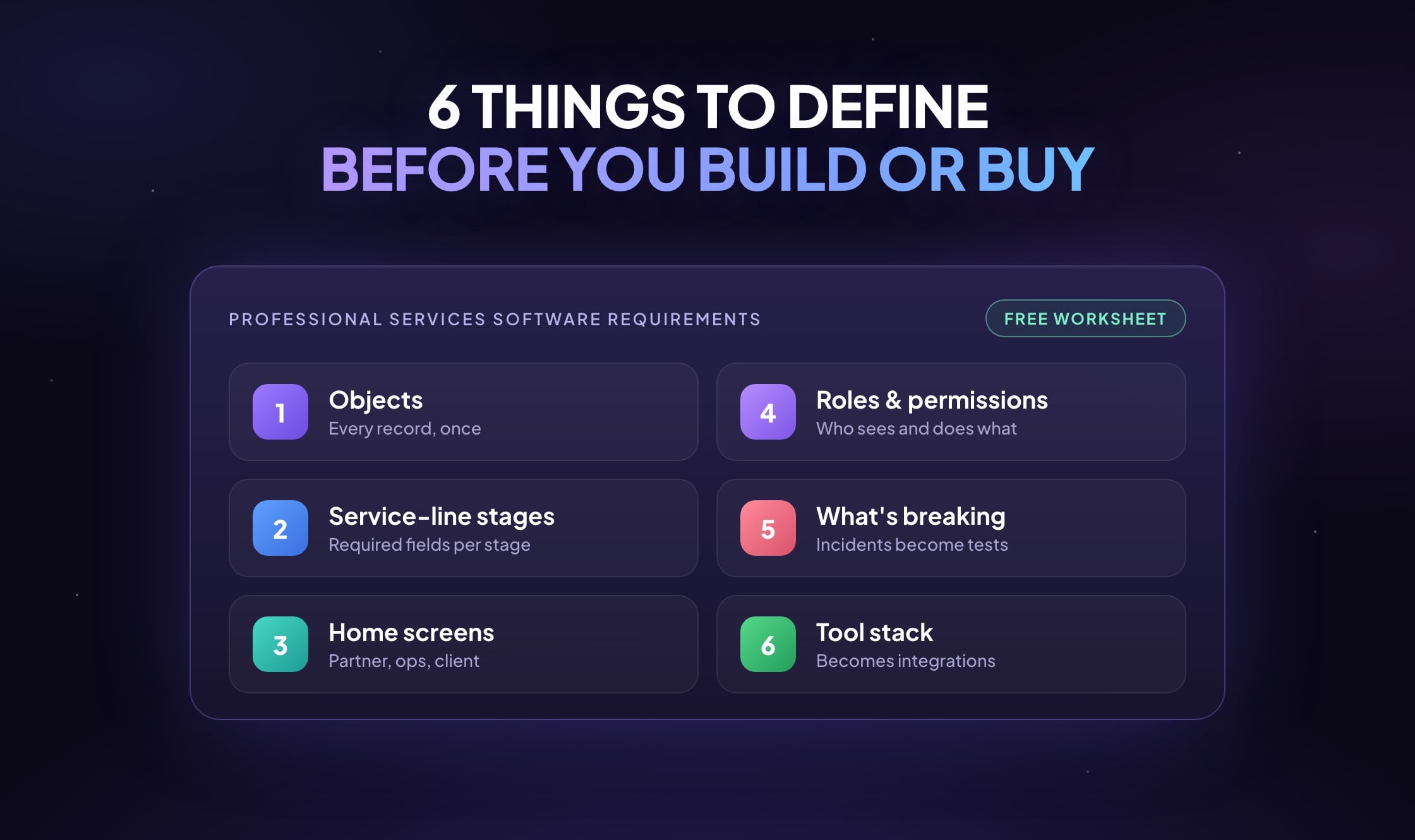
Most professional services software projects go wrong before anyone writes code, because nobody agreed on the requirements first. The brief says “we need one system” or “SharePoint and spreadsheets aren’t working,” a vendor demos a tool, and six months later the firm has the same client in four places and a new set of workarounds.
The fix, however, is unglamorous. Someone has to write down how the firm actually works: what it tracks, how work moves, who needs to see what, and where things break today. We ask every firm to do this before we scope a build, and the same homework pays off if you’re evaluating off-the-shelf professional services automation (PSA) software instead.
Below are the professional services software requirements that homework covers, with the specific fields, stages and roles we ask about. The complete worksheet is free at the end.
Key Takeaways
- Professional services software requirements come down to six things to write down before you buy a PSA tool or build your own: the objects you track, the stages of each service line, what each role sees, who can see and do what, recent incidents, and your tool stack.
- Objects decide the foundation, where every client, engagement and deliverable lives exactly once. Most of a first build’s budget belongs there.
- Required fields at each stage stop half-empty records from moving forward.
- Permissions are hard to retrofit, so decide ten roles before any code, including ethical walls where they apply.
- Rough answers are fine. The free Professional Services Foundation Worksheet has the complete list.
Do these software requirements fit every professional services firm?
If you sell expertise by the engagement, yes. Law firms, accounting and tax practices, management consultancies, architecture and engineering firms, marketing agencies and IT service providers all run on the same small set of records. They just call them different things. A law firm has matters, an accountant has engagements, an agency has campaigns, an engineering firm has projects. Underneath, each one has a client, an owner, a status, dates, a value and a history.
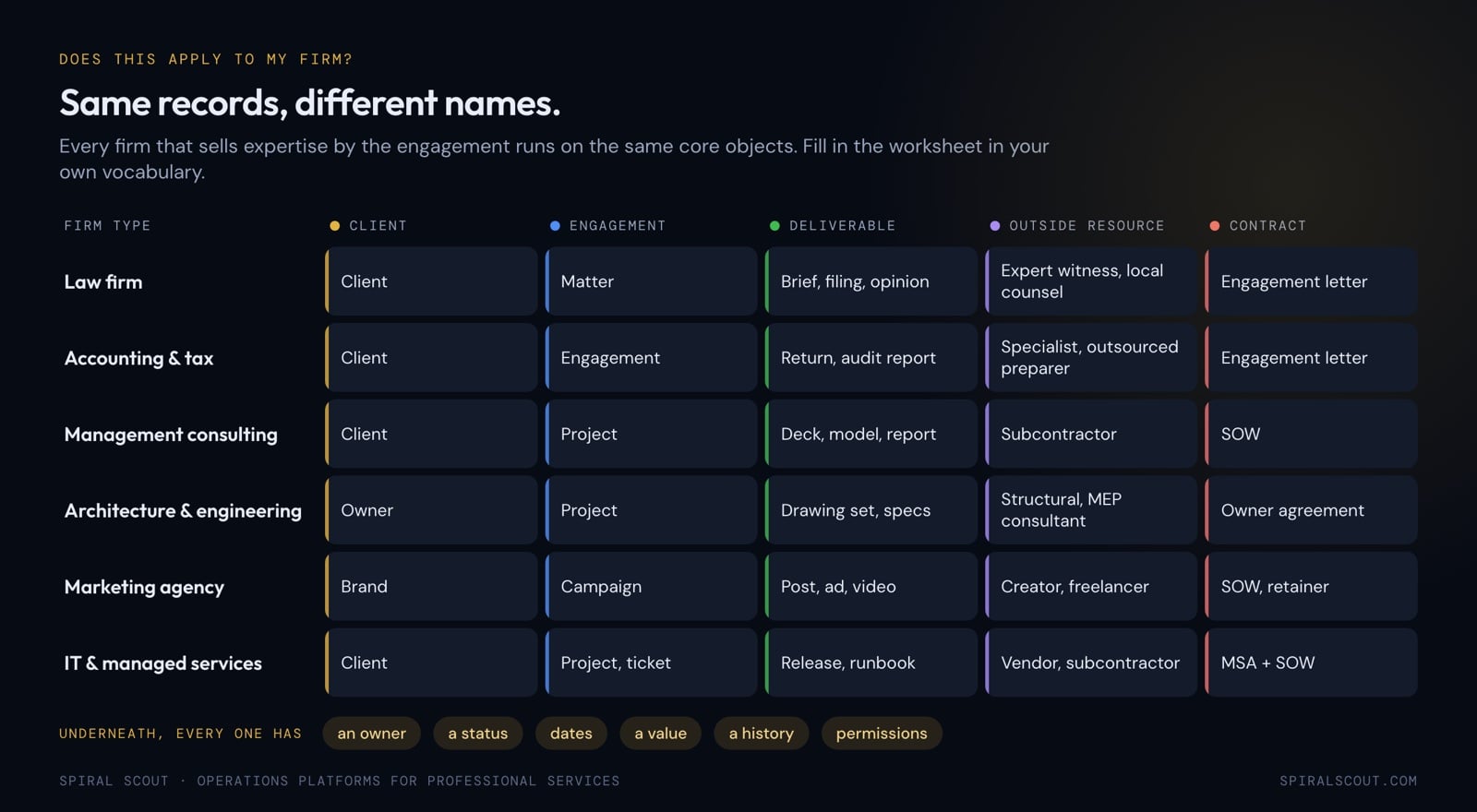
That’s why the same professional services software requirements work across industries. Use your own words when you fill them in, and expect any software you build or buy to use them too.
1. List every object your firm runs on
An object is anything with its own identity, its own history and its own set of properties. A client is an object. So is an engagement, a deliverable, a contract and an invoice. The test: could you pull up a list of all of them and click into one to see its history? If yes, it’s an object.
This step matters most because it decides your foundation, the layer where every important record lives exactly once. Get it wrong, and as a result every dashboard, portal and automation built on top becomes brittle. Most of a first build’s budget should therefore go here.
For each object, write three things:
- Fields you track today. Whatever your team actually fills in now.
- Fields you wish you could track. The questions you can’t answer without a spreadsheet.
- Where it lives today. Which tool, which spreadsheet, whose inbox.
Starting fields for six core objects
Here are six of the twelve core objects with the fields most firms start from:
| Object | Fields to start from |
|---|---|
| Client | Legal name, primary contact, relationship owner, status (active, paused, churned), service lines purchased, contract start and end, monthly fee or retainer, KPI targets, Slack or Teams channel, portal access list |
| Engagement (matter, project, campaign) | Name, client, service line, start date, status, lead, scope summary, current phase, budget or fee cap |
| Deliverable | Type, client, engagement, assignee, status, due date, file link, contracted quota for the period, whether it counts toward quota |
| Team member | Name, role, department, service lines, weekly capacity in hours, manager, time zone, start date |
| KPI or goal | Name, client, service line, target, actual, period, owner, last updated |
| Contract | Client, type (MSA, SOW, NDA, engagement letter), start and end, contracted services, monthly value, renewal date, document link |
The other six are service line, task, outside resource (contractors, experts, creators, subconsultants), report, invoice, and vendor or tool. Add any object that isn’t listed and cross out any that don’t apply. If you’re not sure whether something counts, write it down anyway.
Want the complete list? All twelve objects with example fields and the “wish we could track” prompts are in the free Professional Services Foundation Worksheet.
2. Map your first service line, stage by stage
Don’t map every service line in depth on day one. Pick the one that hurts most, usually the one with the most handoffs and the messiest data, and go deep on it. Then do a lighter pass on the rest.
Specifically, answer seven questions for the deep one:
- Stages. Every stage the work moves through, from first contact to final report, and what triggers each move.
- Required fields per stage. What must be filled in before a card can move forward. This one rule removes most half-empty records.
- Numbers before work starts. Budget, estimate, targets and baselines.
- Numbers after work ends. What gets pulled in automatically and what gets calculated, such as actual hours against estimate or cost per result.
- Automations. Written as “when X happens, do Y.”
- Handoffs. Who hands off to whom, and what the system should do at each one.
- Reporting views. What the team, the client and leadership each need to see at a glance.
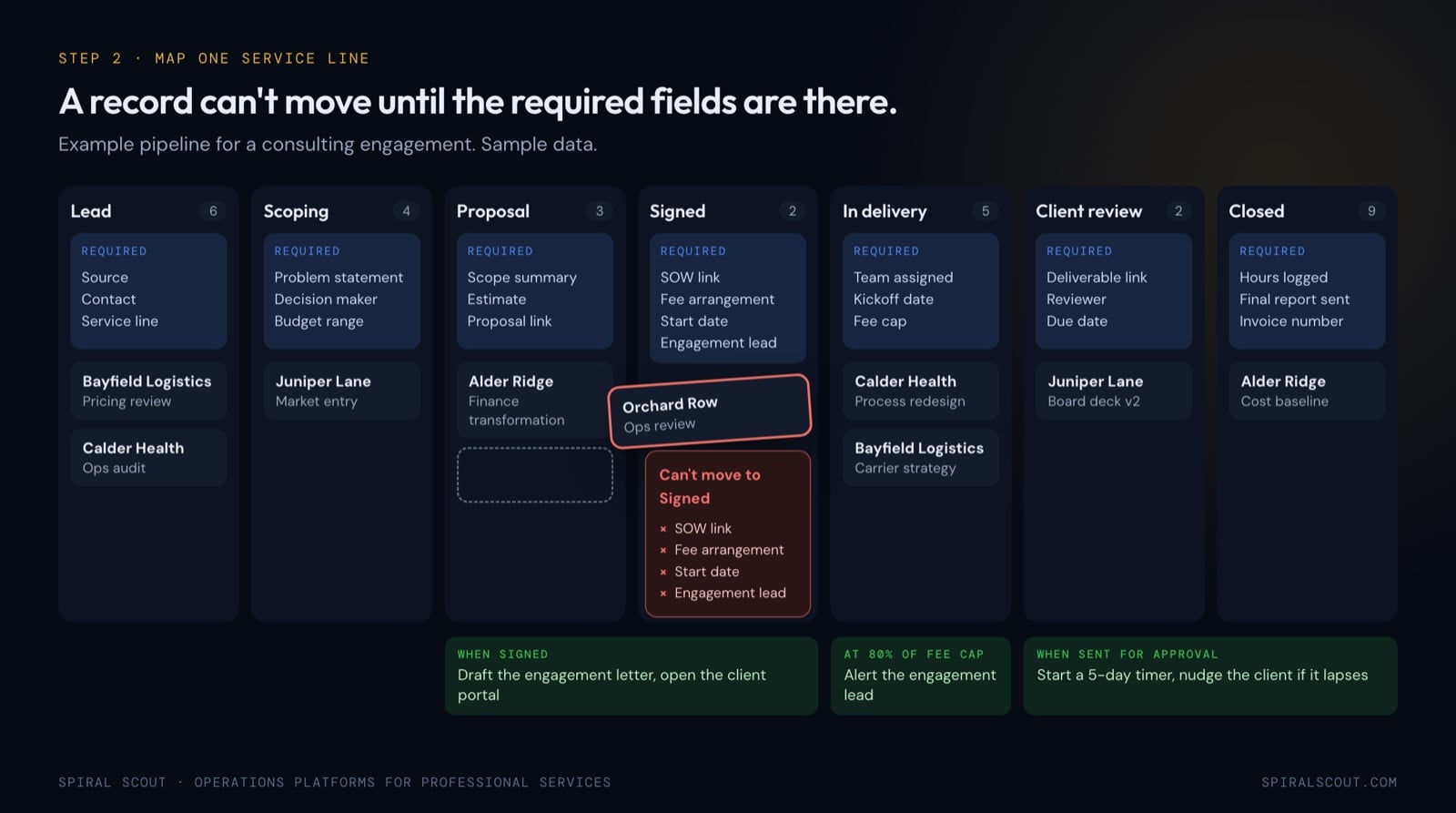
Good automation answers are specific. For example, here are a few we hear from firms:
- When an engagement moves to Signed, draft the engagement letter and open the client’s portal.
- When a deliverable is sent for approval, start a five-day timer and nudge the client contact if it lapses.
- At 80% of the fee cap in logged hours, alert the engagement lead.
- When a client’s KPI sits below target two weeks running, flag the relationship owner before the client notices.
For every other service line, a few lines each is enough: the stages, the data the team needs, the one or two automations that would change their week, the handoffs, and which metrics get reported and how often.
3. Write the home screen for each role
Answers like “KPIs” or “a dashboard” can’t be built. Instead, aim for this level of detail: “month-to-date deliverables against contracted quota for every active client, color-coded red, yellow and green.”
Describe the screen three people see when they log in each morning: the managing partner or CEO, the head of operations, and a typical client. Then list the three to five things each of them should reach in one click.
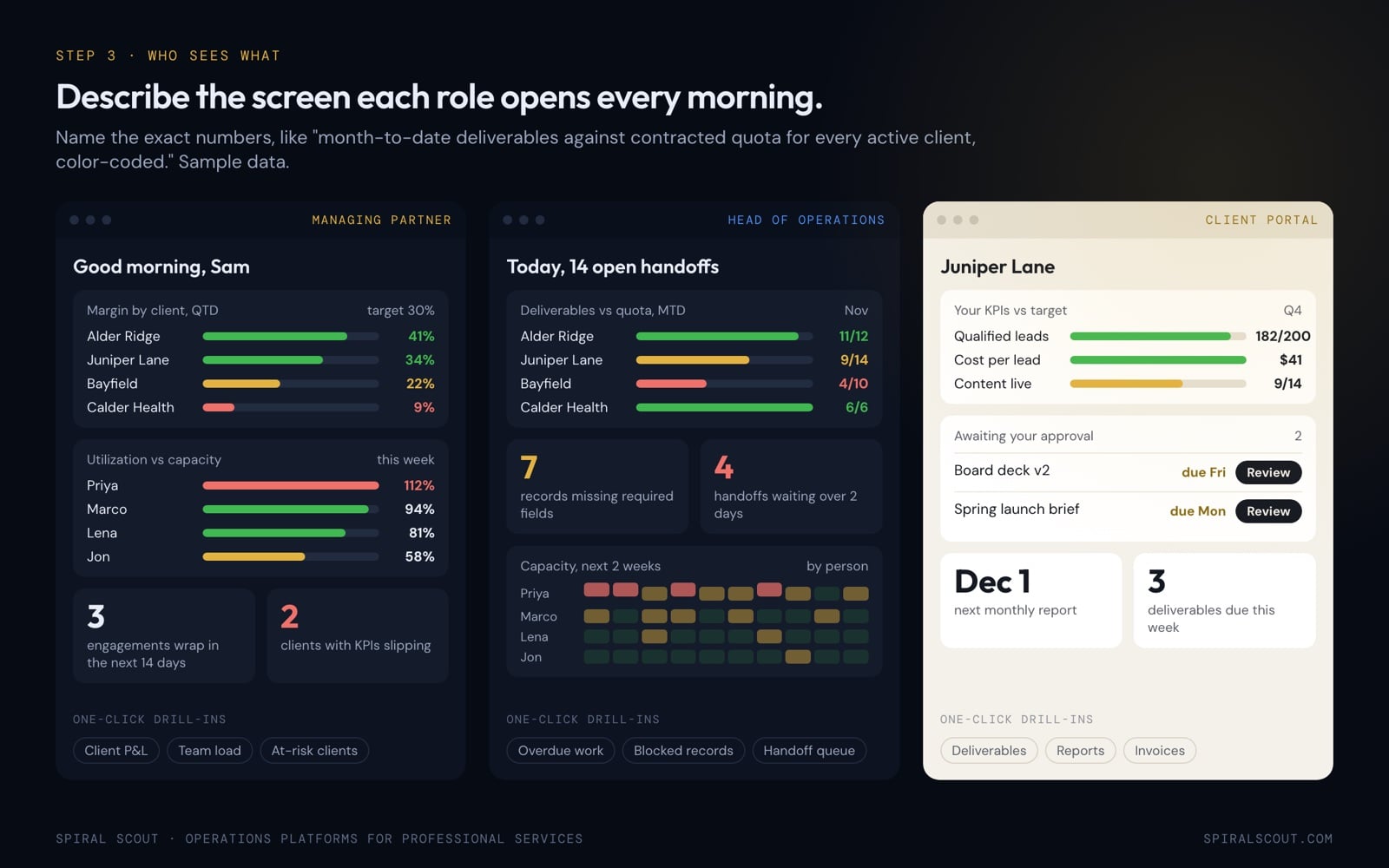
For instance, typical answers look like this:
- Managing partner: margin by client, utilization by person against capacity, engagements wrapping in the next 14 days, and clients whose KPIs are slipping.
- Head of operations: deliverables against quota by client, records missing required fields, handoffs waiting more than two days, and capacity for the next two weeks.
- Client: their own engagements and KPIs against target, deliverables waiting for their approval, and the next report date.
In other words, the client screen is a portal built on the same records your team works in, filtered by permission. Because nothing is copied, it can’t drift out of sync and nobody double-enters data.
4. Decide who can see and do what
Permissions are the part of professional services software requirements most firms skip early and regret six months later. They are very hard to retrofit, so define them before anyone writes code.
For each role, write three lines: what they can see, what they can do (create, edit, delete, approve, export), and what they explicitly cannot see or do. These ten roles are a good starting point:
- Managing partner or CEO: sees and does everything. Confirm or note exceptions.
- Head of operations: everything operational, possibly not financials or margin.
- Relationship owner or account manager: all data for their clients, nothing for other accounts.
- Service or practice lead: their service line across every client.
- Senior staff: assigned work plus the client briefs it depends on.
- Junior staff: only their assigned tasks, with no financial visibility.
- Contractor or freelancer: only the engagement or tasks they were hired for.
- Client admin: their company’s full portal, including approvals and users.
- Client viewer: their company’s portal, read-only.
- Finance: contract values, invoicing and margin, without the work product.
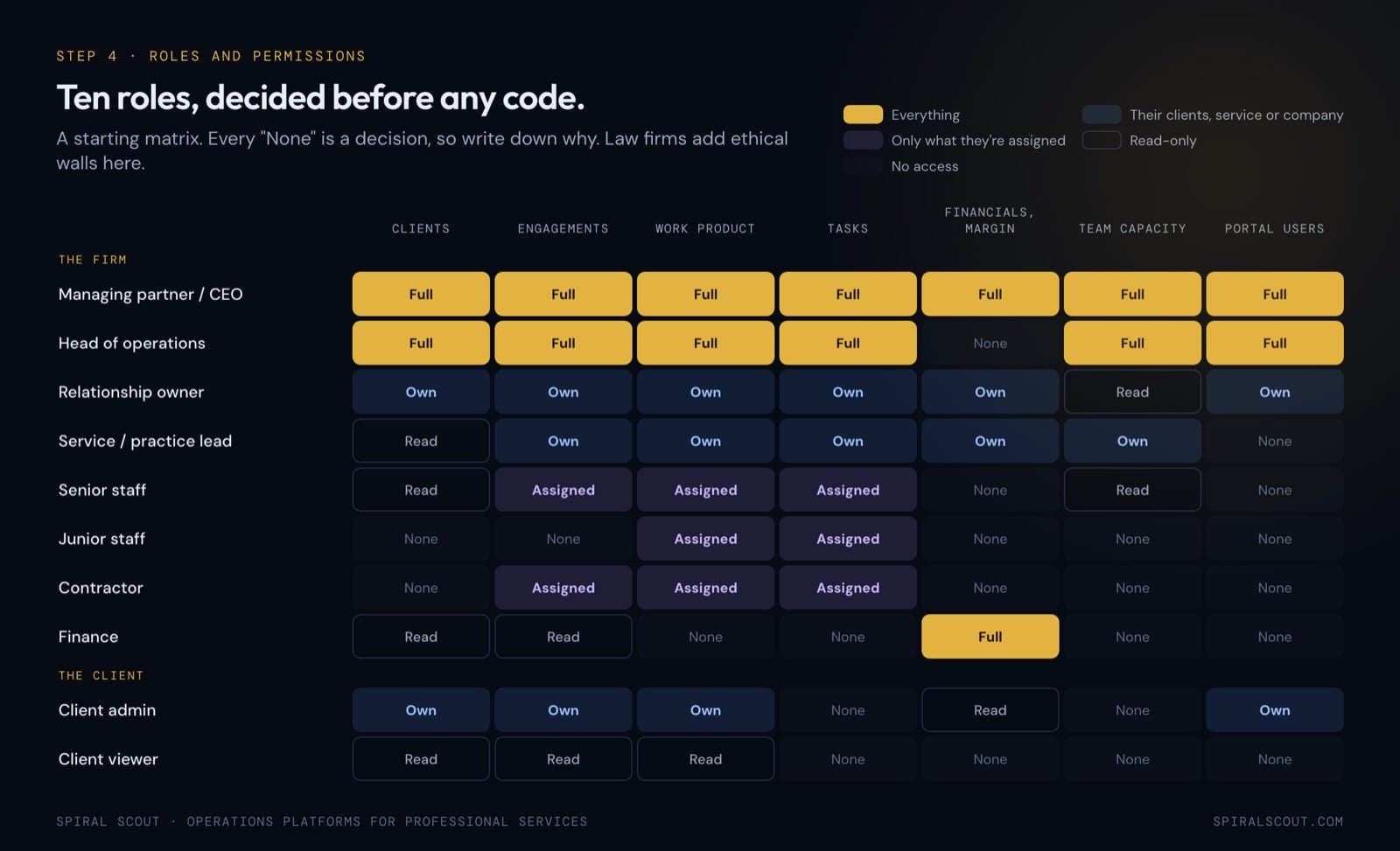
Regulated firms usually also add rules here. Law firms need ethical walls (see ABA Model Rule 1.10 on screening), so a person screened off a matter can’t find it in search, reports or exports. Accounting firms often limit tax and payroll data to the people on that engagement, partly because of the IRS Section 7216 rules on using and disclosing tax return information. Write these as explicit “cannot” lines, since they shape the data model. They also follow the same discipline we apply to permissions and audit for AI agents.
5. Write down what’s breaking, with dates
This section is about how your current setup really performs, and specific beats polite. “The system is slow” doesn’t help. However, “last Tuesday a client comment was missed because the notification fired in the internal calendar but not the shared one” does.
For up to seven incidents from the last 90 days, record when it happened, what went wrong, who noticed and what the workaround was. Each incident then becomes a test case the new system has to pass.
In addition, keep three short lists alongside it:
- What works today. The things you must not lose. They keep the new system feeling familiar.
- Manual work to automate. With how often it happens and how long it takes.
- What has fallen through the cracks. Even once. This is where the real cost of the current setup shows up.
6. List every tool in your stack
Finally, write down every tool the firm pays for or depends on: practice management, CRM, time tracking, billing, document management, e-signature, BI dashboards, chat, analytics and ad platforms. For each, note its purpose, cost, internal owner, who has access, and whether it’s the source of truth for anything or only holds a copy.
This list then becomes the integrations layer. Some data should arrive on a schedule, some on demand, and some tools turn out to be redundant once the foundation exists.
How do professional services software requirements become a build plan?
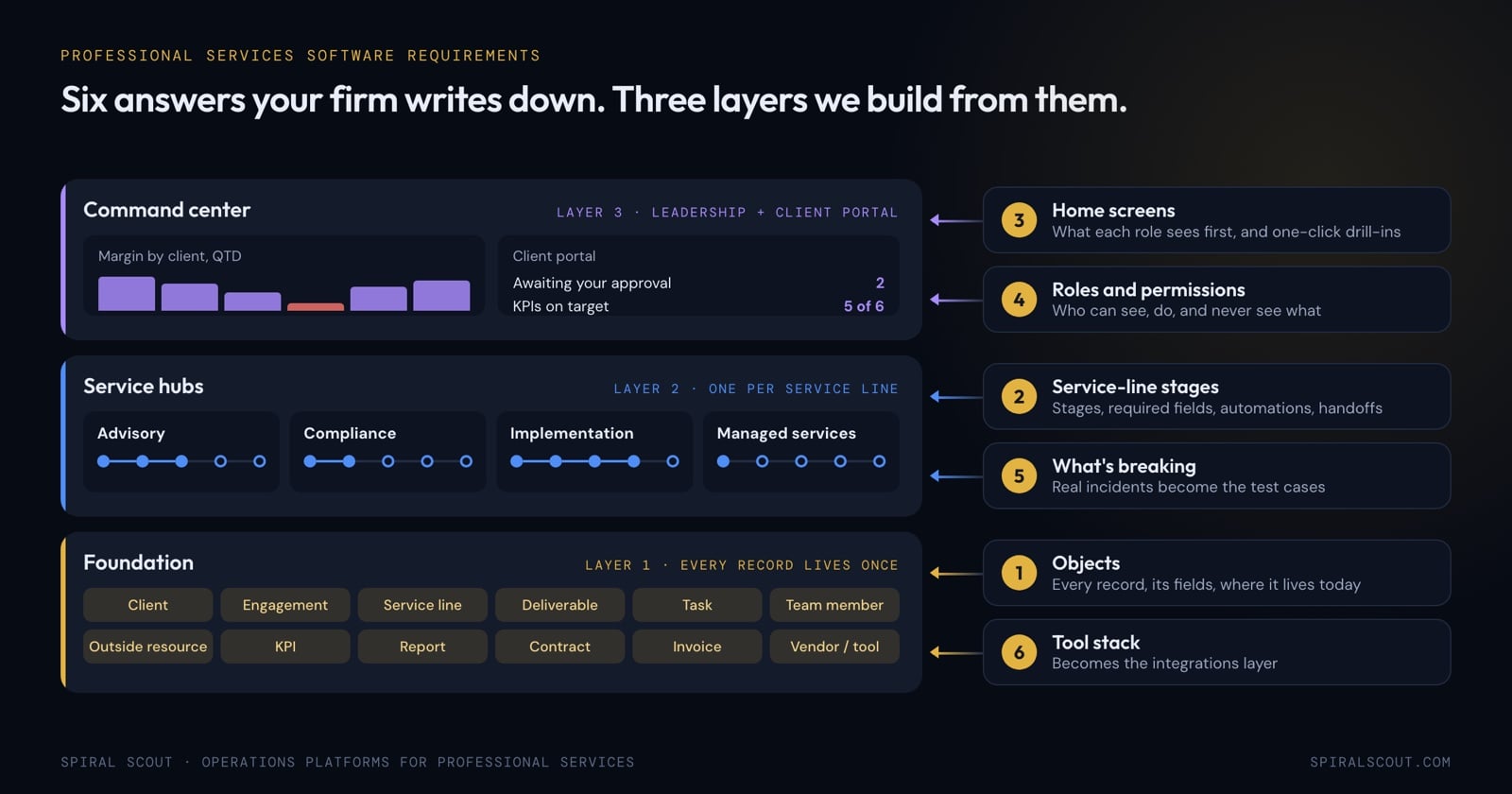
Each answer maps to a part of the system:
- Objects and tools become the foundation and its integrations.
- Your first service line becomes the first service hub, with its stage rules and automations.
- Home screens and permissions become the leadership command center and the client portal.
- Incidents become the acceptance tests.
From there the sequence is the same for every firm: build the foundation properly, get one service hub working end to end, then add the next. Each hub costs less than the one before because the foundation and shared components already exist. We’ll walk through that architecture with an agency example in an upcoming post on the three-layer operations platform.
Clean, structured, permissioned records are also what AI agents need. Firms that want agents to draft reports, triage intake or answer client questions get there much faster once the foundation exists. Our guide to encoding tribal knowledge in professional services AI covers that next step.
How to write your professional services requirements without stalling
- Rough and early beats polished and late. A rough version of everything this week is more useful than a perfect version in two weeks.
- Split the work. The firm leader owns strategy and budget. The head of operations owns objects, service lines and the current state, and can pull in team leads.
- Leave blanks. They show where the real gaps are.
- Write “not sure what you mean.” Anything unclear gets covered in the working session.
Most firms finish a first pass in about 90 minutes.
Get the complete professional services requirements list
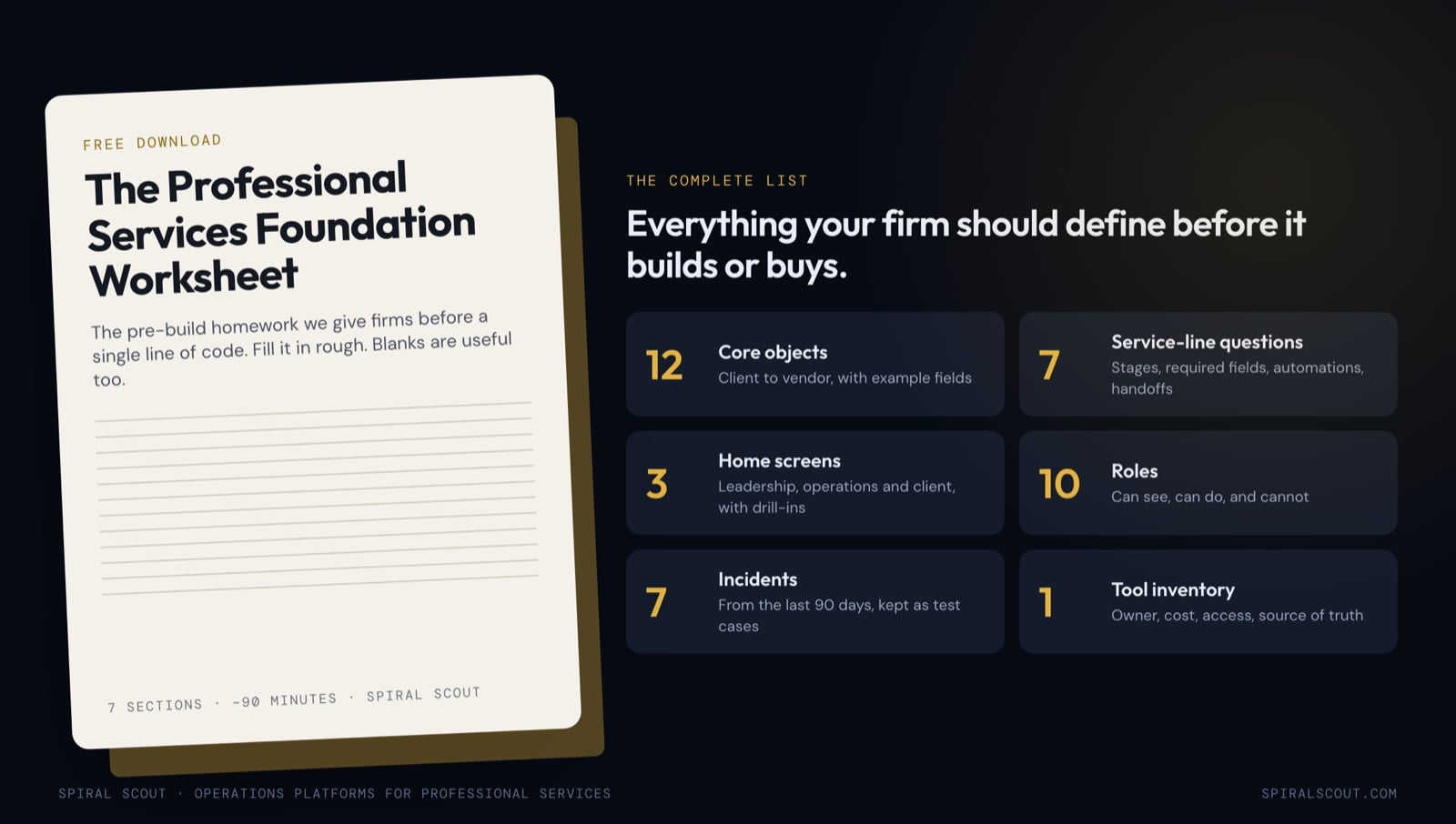
The Professional Services Foundation Worksheet is the full checklist of professional services software requirements, laid out as fill-in sections:
- All twelve core objects with example fields, plus room for the ones you’d add
- The seven-question deep dive for your first service line and the short pass for the rest
- Home-screen and one-click drill-in templates for leadership, operations and clients
- A can see, can do and cannot matrix for ten roles
- The incident log, manual-work list and tool inventory
Download the free Professional Services Foundation Worksheet
Fill it in with your team, send it back, and we’ll come to a working session with your foundation framework already drafted.
If you’d rather work through it live, our product discovery team runs this as a two to three week engagement that ends with a fixed-scope build plan and a clickable prototype.