Short answer: AI agent sprawl is what happens when a company runs more AI agents, automations and copilots than anyone has listed, owns or measures as a group. The signs are familiar: nobody can say how many agents exist, two agents do the same job and give different answers, model spend can’t be traced to a workflow, prompts get edited in production, and agents hold broader access than their job needs. The fix is an agent registry with an owner, version, permissions, cost and success metric for every agent, plus a runtime that enforces those records instead of documenting them.
The first AI agent is a project. Someone sponsors it, someone builds it, and everyone knows it exists. It works, which is the problem.
By month three, other teams want one. By month six there is a custom GPT in sales, an AI step in a Zapier flow in finance, a vendor copilot in support and two internal agents built by different engineers. By month twelve, the CFO asks what the company spends on AI and which of it is working, and nobody can answer without a week of digging.
That is agent sprawl. It is the same problem companies had with SaaS subscriptions and spreadsheets, with one difference: these tools act. They read customer data, send messages and change records. This post covers how sprawl starts, what it costs, the registry every agent fleet needs, and a 30-day plan to get it under control.
Key Takeaways
- Sprawl comes from three forces: building got cheap, vendors switch on AI features in software you already buy, and nobody owns the whole fleet.
- Every agent needs a registry entry with a business owner, version, permissions, cost and a success metric.
- Give each agent only the tools its job needs, meter usage per agent, and trace model and tool calls.
- Thirty days is enough to get control: inventory, assign owners and retire duplicates, scope access and meter cost, then add metrics and tests.
How does AI agent sprawl happen?
Sprawl comes from success without structure, so careful teams end up with it too. Three forces drive it. The first is that building got cheap. With coding agents and no-code builders, a working agent takes an afternoon, and nobody files a request for an afternoon of work.
Agents also arrive inside software you already buy. Gartner predicts that 33% of enterprise software applications will include agentic AI by 2028. Many of your agents will be switched on by a vendor update rather than built by your team.
Then there is ownership. Each agent has a builder, but very few companies have someone responsible for all of them together. Nobody owns the fleet.
We are not immune. In our own go-to-market tooling, we ended up with two modules doing the same LinkedIn engagement job, built in parallel. One scores “worth engaging with” and “buying intent” as two separate numbers. The other uses a single score, a design that buries the best conversations to join, because peers thinking out loud rarely show buying intent.
Only running a real post through the pipeline showed us the difference. The fix is to pick one design and retire the other, which is exactly the kind of decision sprawl lets a team postpone.
7 signs your company has AI agent sprawl
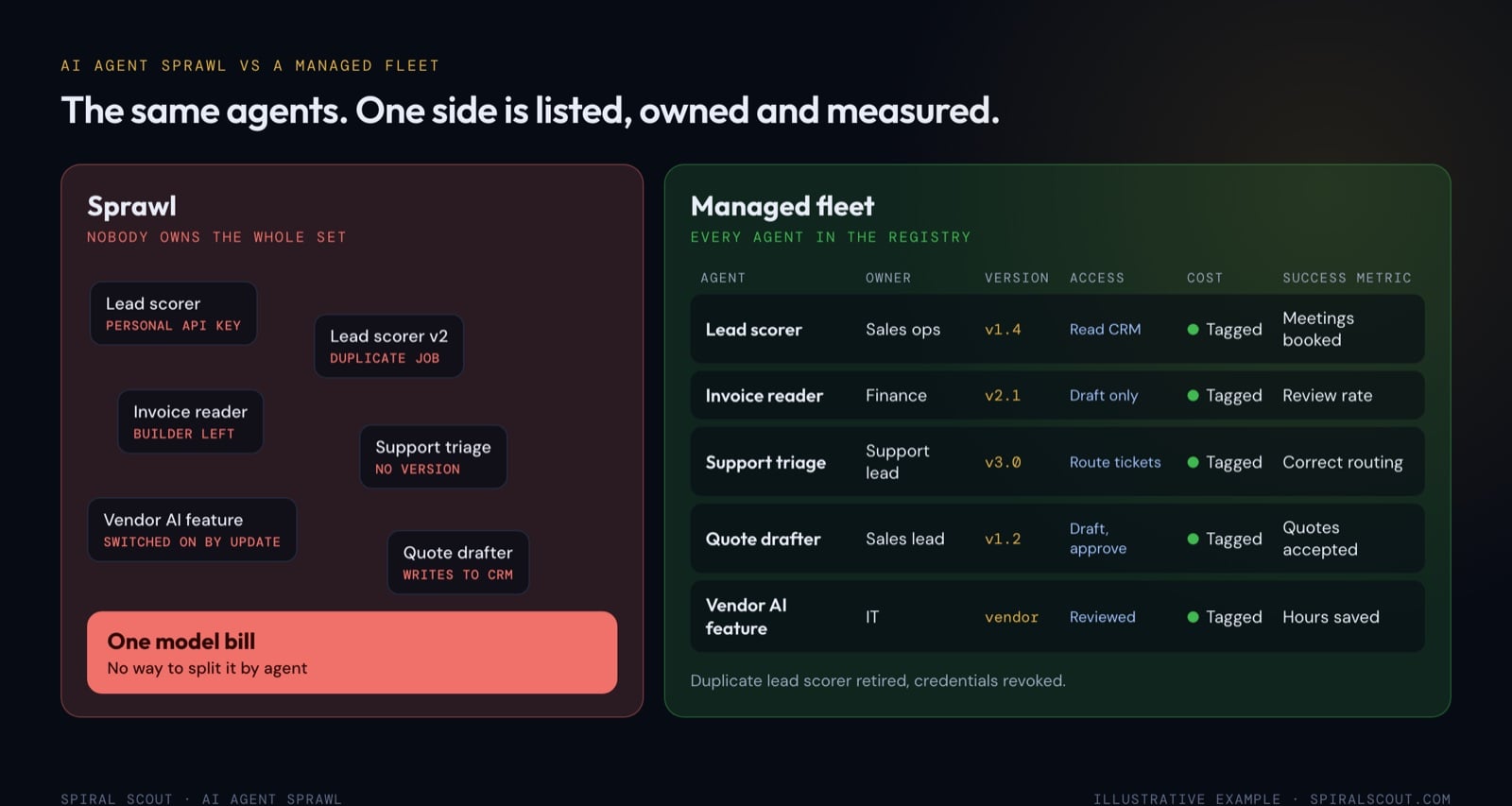
Start with the inventory. The first sign is that nobody can produce a complete list of the AI agents and automations running today, including vendor features that were switched on. The second is two agents that give different answers to the same question, because they read different copies of the data.
Money and change control come next. Model spend arrives as one bill that nobody can break down by agent or workflow, and prompts are edited directly in production, with no version history and no way to roll back. Access is the fifth sign: agents run on someone’s personal API key or a shared admin credential.
The last two signs concern whether agents work and whether they ever stop. Nobody can say whether an agent is working, because it has no success metric and no test set. Agents are never retired either, so pilots that lost their sponsor keep running, keep their access and keep spending.
Three or more of these and you have sprawl. It is fixable, and the earlier you start, the cheaper it is.
What does agent sprawl cost?
The direct cost is duplicated spend: two agents doing one job, pilots that never shut down, and expensive models on simple steps because nobody reviewed the routing. The indirect costs are larger.
Inconsistent answers erode trust. When the sales agent and the finance agent report different revenue, people stop using both. For a marketing intelligence system we designed, the core rule was a single normalized warehouse that every agent reads from, so the numbers are identical no matter which agent you ask.
Security exposure grows quietly at the same time. Every agent with a broad credential is an unmonitored path to your data, and agents built in a hurry tend to get admin access because it is the fastest way to make them work.
Change becomes risky as well. When a vendor changes an API or a model is deprecated, you can’t tell which agents break, so you find out from users.
Audits stall deployments too. When the board or a large customer asks how AI is governed, an incomplete inventory blocks the answer. We covered the architecture side of that question in AI agent governance is an architecture problem.
What should an AI agent registry include?
An agent registry is the single list of every agent you run, with enough detail to answer who owns it, what it can touch, what it costs and whether it works. Start with a spreadsheet if you must. The fields matter more than the tool.
| Field | Why it matters |
|---|---|
| Name and job | One sentence on the work it does. If you can’t write it, the agent is doing too much. |
| Business owner | The person who decides whether it keeps running, who may not be the person who built it. |
| Version | Prompt, model and tool versions currently live, with the previous version to roll back to. |
| Model(s) | Which model each step uses, so deprecations and price changes can be traced. |
| Tools and permissions | Exactly which systems it can read and write, and under which identity. |
| Data it touches | Customer data, financial data or personal data, for compliance answers. |
| Review gates | Which actions wait for a person. |
| Monthly cost | Model usage plus hosting, per agent. |
| Success metric | The number that says it is working, and its current value. |
| Last eval run | When it last passed its test set. |
| Status | Pilot, live, deprecated or retired. |
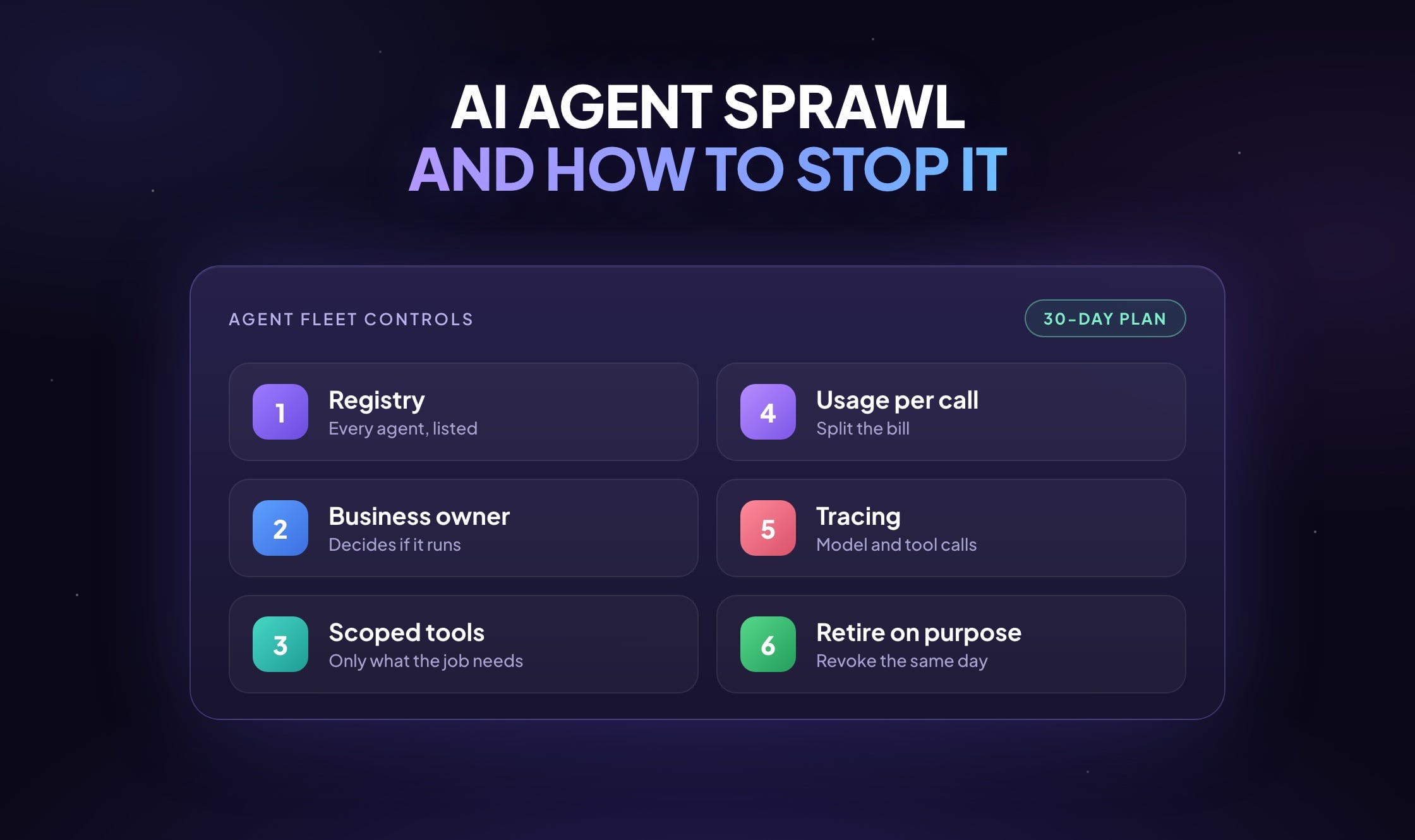
Six controls that stop AI agent sprawl
A registry that is only documentation goes stale within a quarter. The controls below work because the runtime enforces them. We use Wippy, our open-source agent runtime, as the example, but these are the properties to look for in any platform.
1. Every agent is a versioned entry, with rollback
In Wippy, agents, tools and workflows are entries in a typed, versioned registry. Every change is versioned and can be rolled back in one call. A prompt edit stops being an untracked change and becomes a release you can undo.
2. Agents can only call the tools in their definition
Each call is checked against policy, and a denied call fails before the tool runs. Policies are deny by default: if no policy allows an action, it doesn’t happen. Agents also can’t edit their own definitions unless a policy allows it.
3. Remove capabilities by construction instead of by flag
The safest permission is one that doesn’t exist. Our LinkedIn engagement module drafts comments for a person to post, and there is no write path to LinkedIn anywhere in it: no credential, no client. “No auto-posting” can’t be switched on by accident because the code to do it was never written.
4. Record usage per call and tag it by agent
Wippy records prompt and completion tokens for every model call, with the user and a context tag you set, such as the agent or workflow. That turns one model bill into a cost per agent. Note what this doesn’t do: recording usage is not a budget. Enforce limits in your own code or gateway.
5. Trace every model and tool call
With OpenTelemetry tracing on, each model call and tool invocation shows up in one trace. “Which agent changed this record?” then becomes a query instead of an investigation.
6. Retire agents on purpose
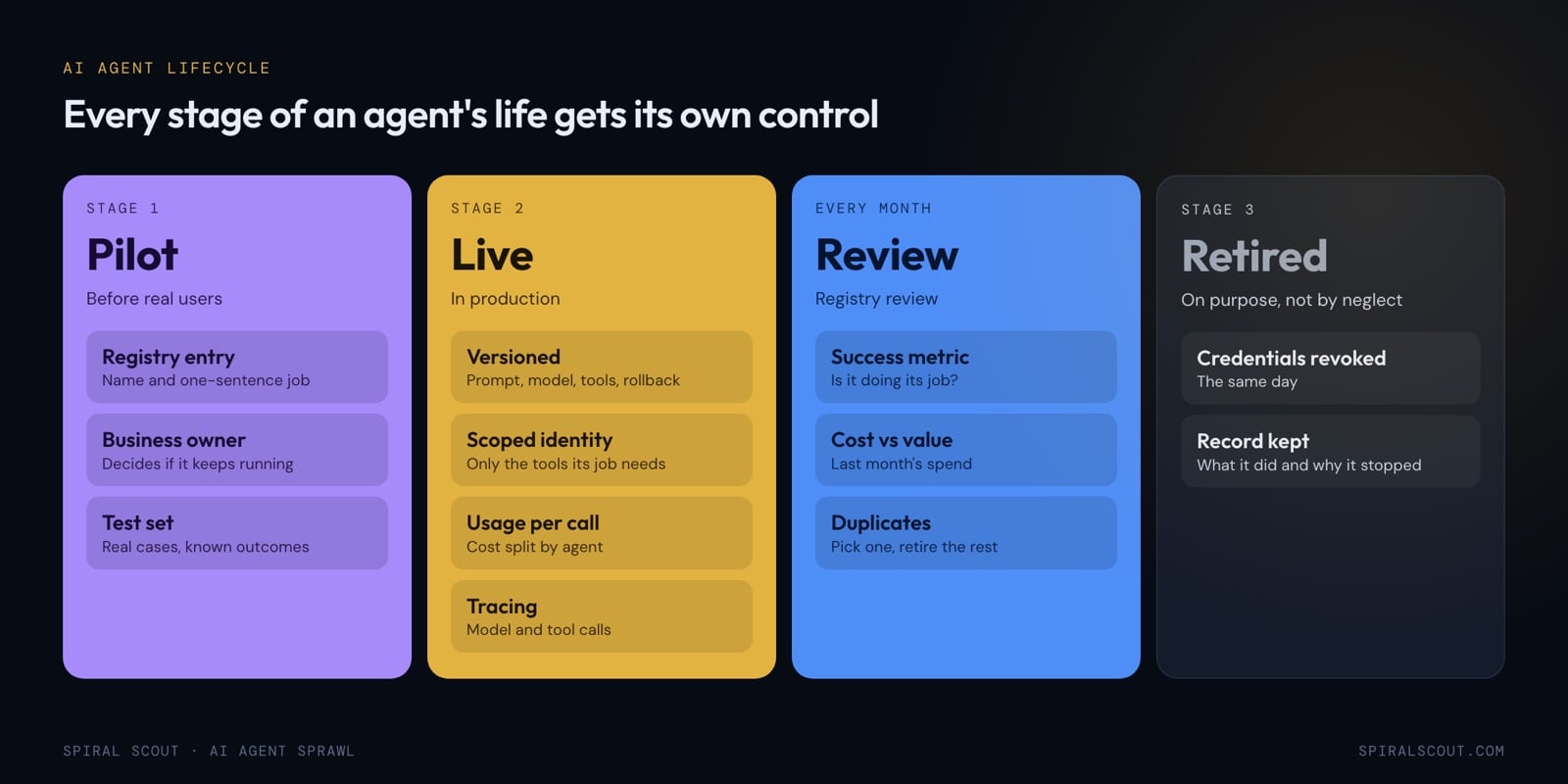
Give every agent a status and a review date. Pilots that miss their metric get retired, and retirement means revoking credentials as well as turning off the schedule. We recommend killing a failing pilot in public; it builds more trust than letting it fade, a point we made in how to get your team to use AI.
A 30-day plan to get agent sprawl under control
Week 1: Inventory
Ask every team lead for every AI agent, automation with an AI step and vendor AI feature they use. Check API keys issued by model providers and look for personal keys on company work. Expect to find more than you think.
Week 2: Assign owners and retire the obvious
Every entry gets a business owner. Anything without one, or anything duplicated, goes on a retirement list. Revoke credentials for retired agents the same day.
Week 3: Scope access and meter cost
Replace shared and personal credentials with per-agent identities scoped to the agent’s job. Tag model usage by agent so next month’s bill can be split.
Week 4: Add metrics and tests to the agents that stay
Each surviving agent gets a success metric and a small test set from real cases. Put the registry review on a monthly calendar.
After that, new agents enter the registry before they reach production. That single rule prevents most of the next wave. If you want outside help with the first pass, the system and data review that opens our AI implementation consulting engagements is a good place to do it.
Mistakes to avoid when cleaning up
Banning agents is the first mistake, because teams will build them anyway, out of sight. Make the registered path the easy path instead.
Buying a governance dashboard first is another. A dashboard that reads from agents you can’t list shows you an incomplete picture with confidence.
Agents also shouldn’t all be treated the same. A read-only summarizer needs a registry entry. An agent that moves money needs review gates, idempotent tools and durable execution.
Be careful, too, about merging agents into one big one. Consolidating duplicates is good, but combining unrelated jobs into one agent trades sprawl for an overloaded agent that drops steps.
Where internal tools fit
Agent sprawl often travels with tool sprawl: small internal apps, each with its own database and logins, that agents then have to stitch together. If that is the bigger problem, the answer is fewer places for data to live. KickSide, the business software we build on Wippy, takes that approach: each tool arrives as a module that plugs into the same data and the same rules, so a new tool doesn’t mean a new silo.
Not sure how many agents you’re actually running?
Start with our free AI Readiness Assessment. It takes under 10 minutes and shows where your data, tools and processes stand before you add another agent. If you already know you have sprawl, talk to us about an architecture review.